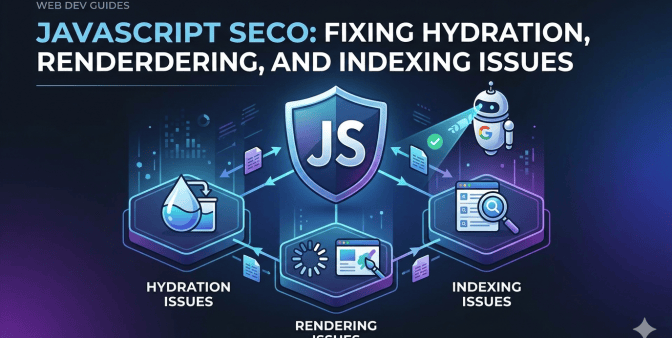
Understanding the Core Problems: Rendering, Hydration, and Indexing
Before deep-diving into fixes, let’s name the unholy trinity of JavaScript SEO nightmares: rendering, hydration, indexing. Each one is huge in how search engines see you. Neglect any, and even the most exquisitely designed JavaScript thing becomes invisible to them.
Rendering: The Foundation of Discovery
Rendering turns your JavaScript into the HTML browsers show. Typically, browsers did this. The browser downloads the core HTML document, runs the JavaScript to create the page. This client-side rendering (CSR) can be tough for search engines. Crawlers might skip JavaScript, or do it inconsistently. They see blank pages or broken pages. Bam! Rankings drop. For stellar JavaScript SEO, consider other rendering paths.
Hydration: Bringing Static HTML to Life
Hydration? Single Page Applications (SPAs), React, Angular, Vue. The JavaScript engine grabs the static HTML (maybe rendered on the server) and adds the interaction. Static? To interactive. Snap! If hydration hiccups, users suffer. Search engines? Broken site. More ranking drops. Bad JavaScript SEO.
Indexing: Getting Found in the Crowd
Indexing: search engines add your pages to their big list. Search engine robots must access and get your content to index you. If your JavaScript hides content, causes problems, or slows loading, indexing suffers. Visibility? Gone. Core JavaScript SEO? Easy indexing.
Server-Side Rendering (SSR): The First Line of Defense
Server-side rendering (SSR): HTML is made on the server before going to the browser. Search engine robot? Sees a full HTML page. No JavaScript needed. SSR? Amazing for JavaScript SEO. Faster loading, better robot access, visible content. SSR can be tough, but wow, the rewards. Great SEO, happy users.
SSR for our product pages? Instant change. Robots saw product details, specs, reviews. Rankings soared for important terms. The trick? Perfect server-rendered HTML. It has to match the final hydrated page. Happy users, happy robots. JavaScript SEO? Begins with great rendering.
Pre-rendering: A Simpler Alternative for Static Content
Pre-rendering makes static HTML files for each section of your site when it’s built. Great for blogs, help sites, promo pages. Easier than SSR, same robot and loading wins. Next.js, Gatsby? Great tools. Pre-render static parts of your site for stellar JavaScript SEO.
Our blog? Client-side to pre-rendering via Gatsby. Wow, faster! Load times dropped, article rankings jumped. Easy pre-rendering let us focus on amazing content. No tricky server stuff. Pre-rendering? JavaScript SEO boost. Easy.
Dynamic Rendering: A Hybrid Approach for Complex Applications
Dynamic rendering? Client-side meets server-side. Robot? Server-rendered HTML. User? Interactive client-side. Serve perfect stuff to robots, keep great interaction for people. Tricky to set up, but useful for complex sites. Make sure robots get the right stuff. No misleading them! JavaScript SEO? Serve the right content to the right visitor.
We tested dynamic rendering on a section with static text and interactive parts. Looked promising. Making sure the robot content was current? A challenge. Dynamic rendering needs constant care. Test everything. Robustness is key. Remember: JavaScript SEO? Always moving, never done.
Fixing Hydration Issues: Ensuring a Smooth Transition
Hydration errors? Server HTML doesn’t match client JavaScript HTML. Uh oh. Weirdness, broken stuff, unhappy users. Worse? Confused search engines, awful JavaScript SEO. Finding hydration issues? Tough. Compare server HTML to client HTML. Attributes, text, structure? All the same? Dev tools and framework tools help. Watch out for data issues. Dates? Numbers? They break things.
We had a date issue. Server? One format. Client? Another. Dates displayed wrong after hydration. Fix? Same date format everywhere. JavaScript? Parse and show them correctly. Hydration is vital for users and JavaScript SEO. Smoothness is key.
Optimizing JavaScript for Indexing: Making it Easy for Crawlers
Perfect rendering and hydration? You still might have indexing problems. Robots have limits. Time and resources. Make it easy for them! Clear site structure? Vital. Descriptive URLs, internal links, great sitemap? Guide them. Small, simple JavaScript? Key. Avoid huge changes, long scripts, performance hogs. Code splitting, lazy loading? Load only what’s needed. Google Search Console? Watch for crawl issues. Fix them fast. JavaScript SEO? Easy crawling.
We sped up crawling by lazy loading images and videos. Faster loading, focused robots. Complete sitemap submitted to Google. Pages indexed? Soared. Rankings? Rose. JavaScript SEO? Constant work.
Leveraging Structured Data: Helping Search Engines Understand Your Content
Structured data (schema markup)? Standard way to tell search engines about your content. Help them understand. Improves visibility, adds cool snippets (star ratings, prices, dates). Huge for JavaScript SEO. Robots get info, even if JavaScript is tricky. JSON-LD? Google’s favorite. Schema.org? Define your content. Google’s Rich Results Test? Check your work.
Product pages got structured data. Names, descriptions, prices, availability. Rich snippets in search results? Click-throughs soared. Structured data? Powerful JavaScript SEO. Stand out, attract clicks.
Monitoring and Measuring: Tracking Your Progress
JavaScript SEO? Never done. Constant watchfulness needed. Google Analytics, Google Search Console? Track traffic, rankings, crawl stats, load times. Regular checks? Find new problems. Stay current on JavaScript SEO wisdom and Google changes. Constant monitoring? Maximize impact.
The Takeaway: JavaScript SEO is a Journey, Not a Destination
Our JavaScript SEO trip was long, tough, filled with problems. But we learned the core stuff, used the correct solutions, watched our progress. We unleashed our JavaScript site’s potential. Biggest lesson? JavaScript SEO never stops. Constant attention needed. Embrace the challenge. Stay curious. Never stop learning. The wins from mastering JavaScript SEO? Worth it.
Leave a Reply